The first time I packed my Mini 4 Pro for a flight, I put the drone in its soft shoulder bag, wedged the bag into my carry-on, and called it done. Somewhere between Spokane and Boise, a water bottle shifted, the bag got squeezed, and I landed with a gimbal that made a grinding noise every time the camera moved. Nothing was broken. But I spent the whole trip babying that drone instead of flying it. That was about two years ago, right when I bought the JSVER hard case, and I have not packed a drone any other way since.
This is the routine I use now, step by step, for every trip. It takes about ten minutes once you have done it a few times. It works for a carry-on, a checked bag, or the back of my work truck, and it has gotten my Mini 4 Pro through six flights, a dozen hotel rooms, and a lot of dusty farm roads with zero damage.
Pack It Once, Fly It the Second You Land
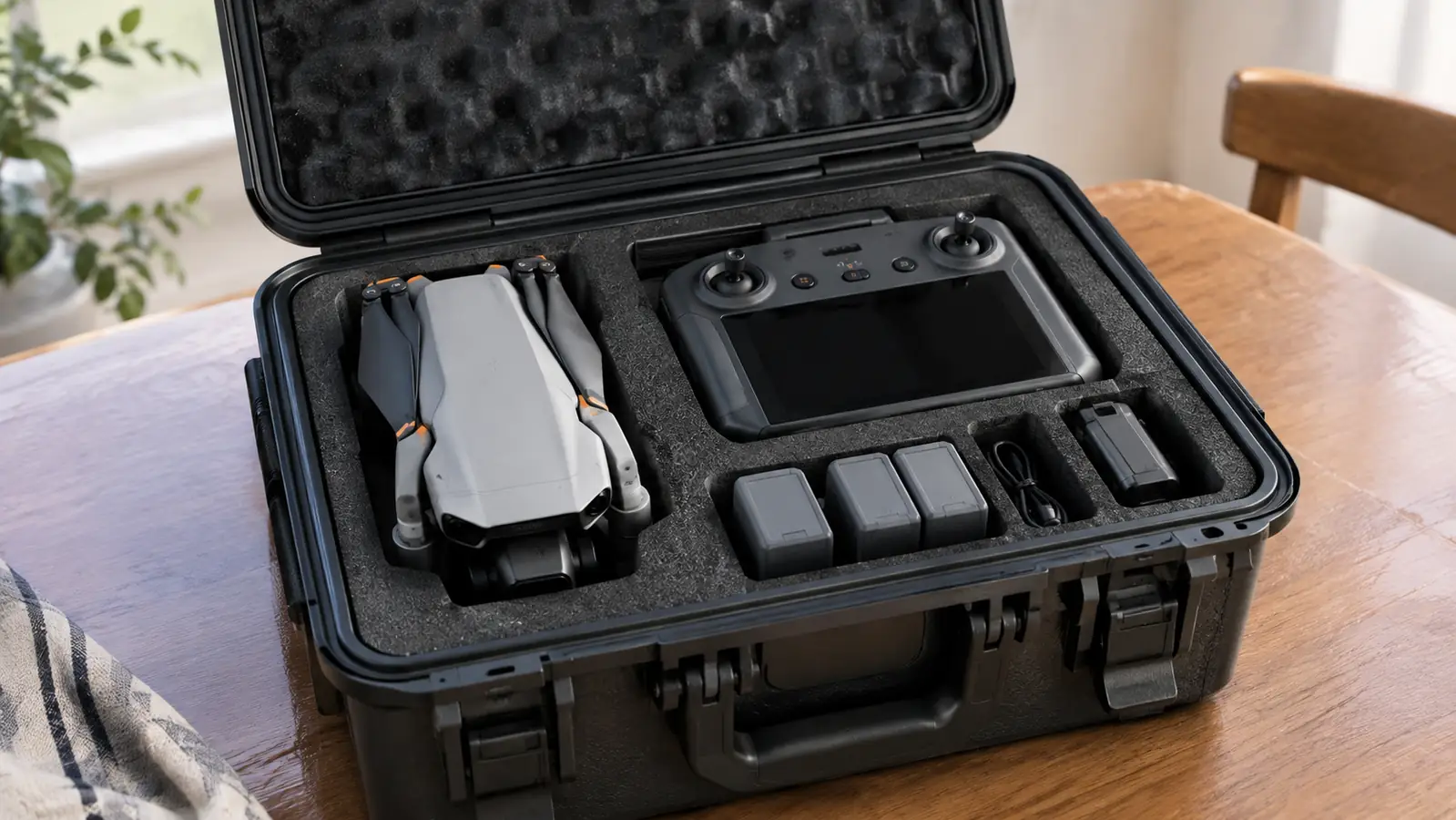
The JSVER hard case holds the Mini 4 Pro, the RC-N2 controller, batteries, props, and cables in one foam-lined shell. It is the case I have used for every trip since I stopped trusting soft bags.
Amazon Check Today's Price on Amazon →Step 1: Charge Everything the Night Before, Then Check It Again in the Morning
Dead batteries are the most common reason a drone sits in its case on a trip. I charge the controller and every battery the night before I leave, then I check them again in the morning. The Mini 4 Pro batteries drain a little just sitting there, and the controller seems to lose charge even faster. If I am flying at the end of a travel day, I want everything at full before the case ever closes. On a trip to the Palouse last spring I skipped the morning check because I was running late, and one battery came out of the case at 62 percent. It was fine for a short flight, but I spent the whole day working around it instead of just flying.
One thing I learned the hard way: do not charge with the drone still in the case. The JSVER case has a cutout for the drone, and the drone fits in it with the battery installed. But charging inside the case traps heat, and heat is the one thing that actually shortens these batteries. I pull the drone out, charge it on the counter, and put it back when it is done. It adds maybe two minutes to the routine, and it keeps the battery from spending an hour cooking inside a foam-lined box.
If you are flying somewhere with different weather, this is also the moment to think about what you are carrying. Cold air drains these batteries faster than anything else I have seen. I fly a lot in north Idaho in the fall, and I have watched a battery go from half to dead in what felt like ten minutes of hovering. Pack a spare or two. The JSVER case holds three batteries in their own cutouts, and I use all three slots on every trip. The third battery has saved more than one evening flight when the first two came down warmer than I liked.
Step 2: Put the Gimbal Cover On and Fold the Props
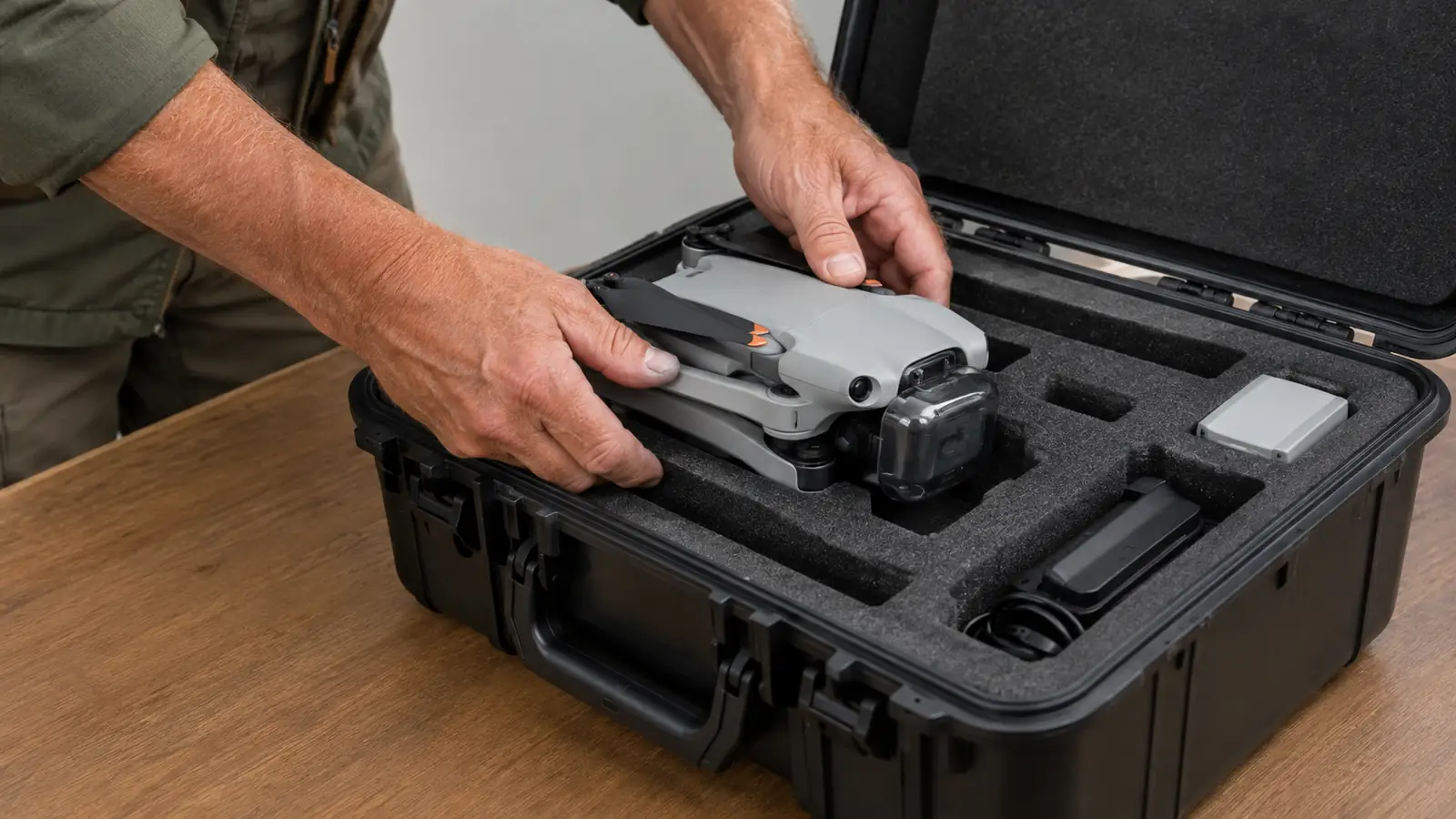
The gimbal is the most delicate part of the whole drone, and it is the part that gets damaged when a bag gets squeezed. I put the clear gimbal cover on before the drone goes anywhere near the case. It takes two seconds and it protects the camera from pressure, dust, and the corner of a hard case lid that did not quite close right. The cover is the first thing I check when I unpack at the other end, and it has never once been knocked loose.
Fold the props in and give them a quick look while you are at it. I check for nicks and bent tips every time I pack, not every time I fly. A prop that looks fine in the driveway can snap on the second flight of a trip, and then you are stuck hunting for a replacement in a town you do not know. I carry one spare set of props in the mesh pocket of the JSVER case, and I have needed them exactly once, on a trip to Lake Coeur d'Alene. A prop picked up a small nick on a gravel launch spot, and the spare meant I did not lose a day of flying.
The drone goes into the case gimbal side up. The foam cutout in the JSVER case is shaped exactly for the Mini 4 Pro, so there is not much room for it to move. That is the point. The drone should fit snugly enough that it does not rattle when you pick the case up by the handle. The first time I closed the case I expected to have to press the drone down into the foam. I did not. It drops in and sits at the right depth, with the gimbal cover just below the lid line.
Step 3: Seat the Controller and the Cables in Their Cutouts
The RC-N2 controller fits in its own foam cutout in the JSVER case, right next to the drone. I put the controller in with the sticks screwed down, and I leave the phone clamp attached. Some people take the clamp off to save space, but I have found it fits fine with it on, and it means one less thing to lose at the airport. The cutout is deep enough that the controller sits below the lid, and the sticks have never once been bent in transit.
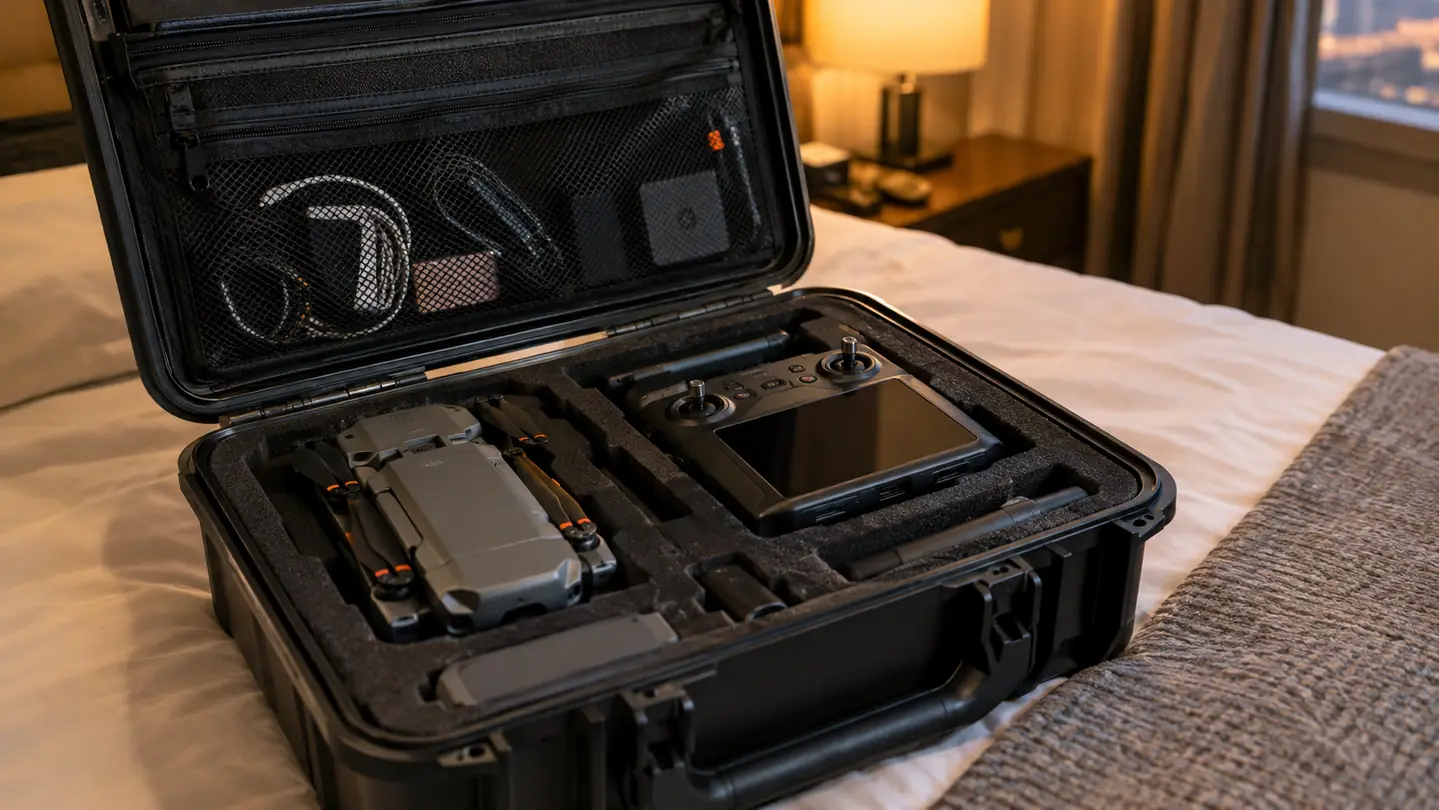
Cables go in the mesh pocket on the inside of the lid. I carry the charging cable for the controller, a USB-C cable for my phone, and a spare data cable. That is it. I used to carry every cable I owned, and it made the case harder to close and the pocket harder to use. Three cables, all coiled neatly, and I can see every one of them at a glance. I coil each one around two fingers, tuck the plug end under the loop, and drop it in. It keeps the pocket from turning into a rat's nest by day three of a trip.
If you fly with a tablet like I do, this is also where the tablet holder goes. I use a Hanatora holder with an iPad mini, and it fits in the lid pocket of the JSVER case without any trouble. The holder is the bulkiest thing I carry besides the drone itself, and it still leaves room for the spare props, the ND filters, and a small microfiber cloth. I keep the ND filters in their little plastic cases so they do not scratch each other, and the cloth goes on top so it is the first thing my hand finds when I want to wipe the lens.
Step 4: Close It, Squeeze It, and Give It the Shake Test
Before I zip or latch anything, I close the lid and press down on all four corners. The foam should compress just a little and the lid should sit flush. If the lid bulges anywhere, something is sitting too high, and it will get crushed on the first bump. I have seen a battery pushed out of its cutout by a lid that did not close flat, and the battery was fine, but it took me ten minutes to figure out why the case would not latch. The fix was simple: the battery was sitting on top of a cable that had worked its way under the foam.
Then I do the shake test. I pick the case up by the handle and give it a firm shake, the way a baggage handler might. If I hear anything moving, I open it back up and find out what. The JSVER case has a hard shell and dense foam, so the drone should not move at all. The only thing I ever hear is the zipper on the mesh pocket, and I have learned to tuck that zipper pull under the flap before I close the lid. That one habit has saved me from opening the case at the gate to check a noise that was never anything.
This is also the moment to check the latch. The JSVER case uses two latches that click shut, and I always double check both. A case that opens in transit is worse than no case at all, because the drone is still protected by the foam, but it is rolling around an airplane cargo hold or a truck bed with nothing holding it in place. I check the latches the same way I check the truck door: click, then pull, then click again. It takes three seconds and I have never found one open.
Step 5: Pack the Case Itself and Get Through the Airport
The JSVER hard case goes in my carry-on, flat against the back panel, with the handle facing up. I put soft things on top of it, like a jacket or a change of clothes, and nothing heavy. The case is hard, but it is not indestructible, and a laptop dropped on top of it in an overhead bin will still make you wince when you open it later. I learned that on the Boise trip, when my laptop bag landed on the soft bag that used to carry the drone.
At security, the drone case goes in a bin by itself, the same way a laptop does. I have flown with this case six times and I have never had TSA ask me to take the drone out of it. The batteries stay in the case, in their cutouts, and I have never had a problem with that either. What I have learned is to keep the case near the top of my bag so I can pull it out fast instead of digging through everything I packed. On the last trip, the case came out in about fifteen seconds and went straight into its own bin.
One more thing about flying: I never check the drone. The JSVER case fits in a carry-on easily, and the drone is the one thing I do not want to explain to an airline if it disappears. Checked bags get lost. Carry-ons mostly do not. I have had a checked bag go to Denver when I was flying to Seattle, and I have never wanted to repeat that feeling with a drone in it. The case is small enough that it does not cost me any real carry-on space, and that trade is worth it every time.
What Else Helps
A hard case solves the packing problem, but a few small things make the whole system work better. I keep a microfiber cloth in the lid pocket for wiping the gimbal and the lens. I keep a spare set of props in there too, the ones I mentioned in Step 2. And I keep a small notebook and a pen, because I have learned that the best flight plans I make on a trip are the ones I write down before I forget them. The notebook has a list of launch spots I have used in north Idaho, with notes on which ones were windy and which ones were worth a second visit.
I also label the outside of the case with my name and phone number on a piece of tape. It looks a little low-tech, but it has saved me twice. Once at a hotel when I grabbed the wrong bag from the trunk, and once at an airport when I set the case down next to an identical one and only noticed because my tape was a different color. The JSVER case does not come with a luggage tag, so the tape is my version of one. A strip of blue painter's tape has outlasted every fancy tag I have ever owned.
The shake test has saved me more times than I can count. If the drone moves when the case moves, it is not packed right, and it takes thirty seconds to fix.
If you fly with extra batteries, check the rules before you go. The rules change, and they are different in different countries. I have only flown domestically with this setup, and I have never had an issue, but I still check every time. It takes two minutes and it beats finding out at the security checkpoint. I check the airline's page the night before, right after I charge the batteries, so the whole routine happens in one sitting.
Ten Minutes of Packing, Zero Surprises at the Airport
The JSVER hard case has carried my Mini 4 Pro through six flights and a lot of truck-bed miles. If you are still packing your drone in a soft bag, this is the upgrade that pays for itself the first time you do not have to worry about it.
Amazon Check Today's Price on Amazon →